BYOT: I built a way to run the tests you already have in production
Your Playwright and k6 tests only run when you deploy, but production can break at any time. BYOT is an open-source, self-hostable platform that runs those same tests on a schedule in isolated Docker containers and pings Slack when something really breaks. This post covers why I built it, how it works, and what I learned.
 Ritik Srivastava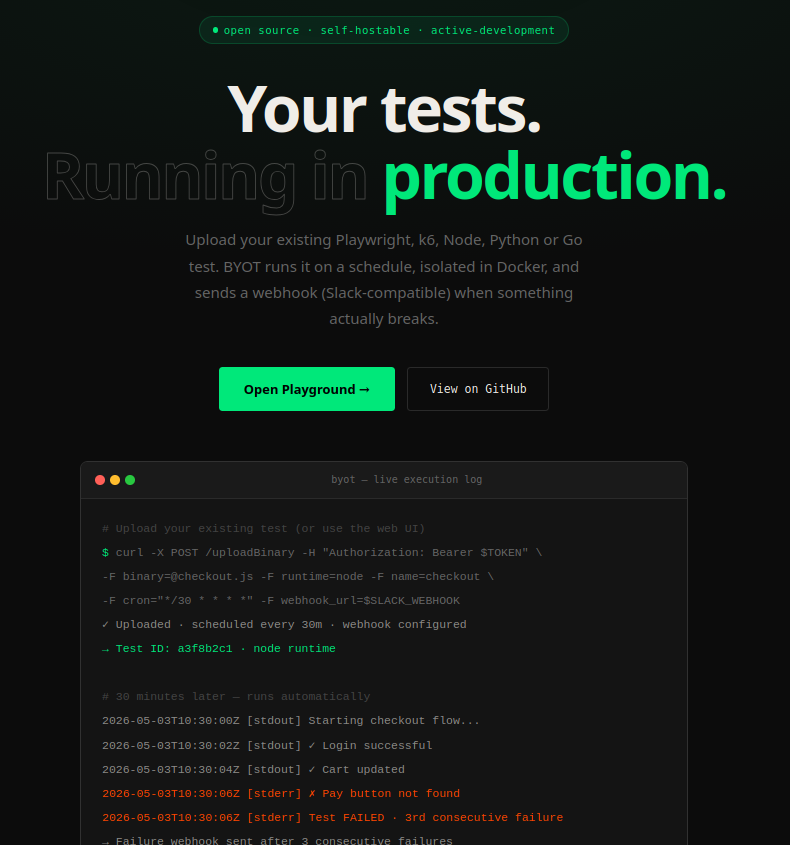
Every team I’ve worked with has a folder of tests that nobody looks at after a deploy.
There’s a Playwright suite that logs in, adds something to the cart and checks out. There’s a k6 script someone wrote during a load-testing week. There’s a little Node script that hits the payments API and checks the response. They’re good tests, written by people who know the product. And they only ever run in CI, which means they only run when we change our code.
But production doesn’t wait for a deploy before it breaks.
That gap is why I built BYOT (Bring Your Own Tests).
- GitHub: github.com/alexanderritik/BYOT
- Live playground: playground-byot.duckdns.org
The problem: CI checks your code, not your business
The first thing people say is: “I can just put my Playwright tests on a GitHub Actions cron.” You can, and I did for a while. Here’s the kind of day that changed my mind:
Monday  9am  — deploy ships ✅
Monday  3pm  — a payment provider quietly changes their API
Monday 11pm  — checkout is broken ❌
Tuesday 9am  — a customer emails support
CI never ran, because nobody pushed any code. The things that break production most often aren’t in your repo at all: a third-party API changes its response, a CDN goes down, an SSL certificate expires, the database runs out of connections.
So I started thinking of it as two different questions:
CI/CD  →  "did my code break?"
BYOT   →  "is my checkout working right now?"
The second question needs a test running continuously, whether or not anyone deploys.
Why not just buy a monitoring tool?
Synthetic monitoring tools exist, and they’re good. But nearly all of them want you to rewrite your checks in their format, inside their UI, on their cloud. You already have a Playwright test that clicks through checkout. Why rebuild it in someone else’s DSL?
That became the whole idea, and it’s also the name:
Bring your own tests. Upload the test you already have, choose a runtime, set a schedule. BYOT runs it in an isolated container and alerts you when it actually breaks.
I also wanted it to be open source and self-hostable. Tests that check production usually need production credentials, and a lot of teams (mine included) aren’t comfortable sending those to yet another SaaS.
What BYOT does
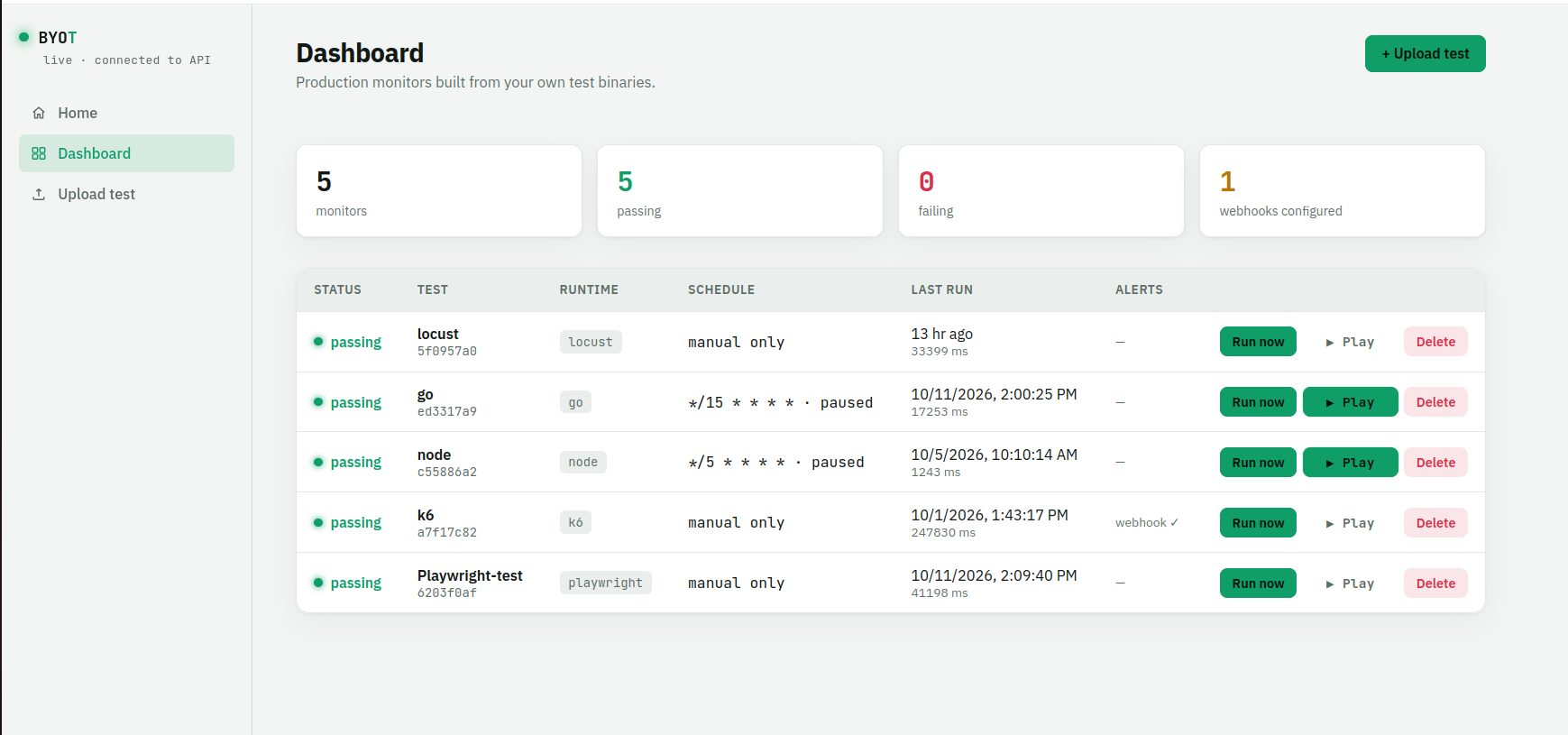
In short:
- Any runtime.
node,python,go,k6,locustandplaywright(uploaded as a zip bundle). - Cron scheduling. Each test gets its own schedule, plus a global pause/resume switch.
- Isolated execution. Every run gets a fresh, hardened Docker container that’s deleted afterwards.
- Alerts that don’t cry wolf. Slack-compatible webhooks with a consecutive-failure threshold and a recovery message.
- Secrets done properly. Encrypted at rest, write-only through the API, and redacted from logs.
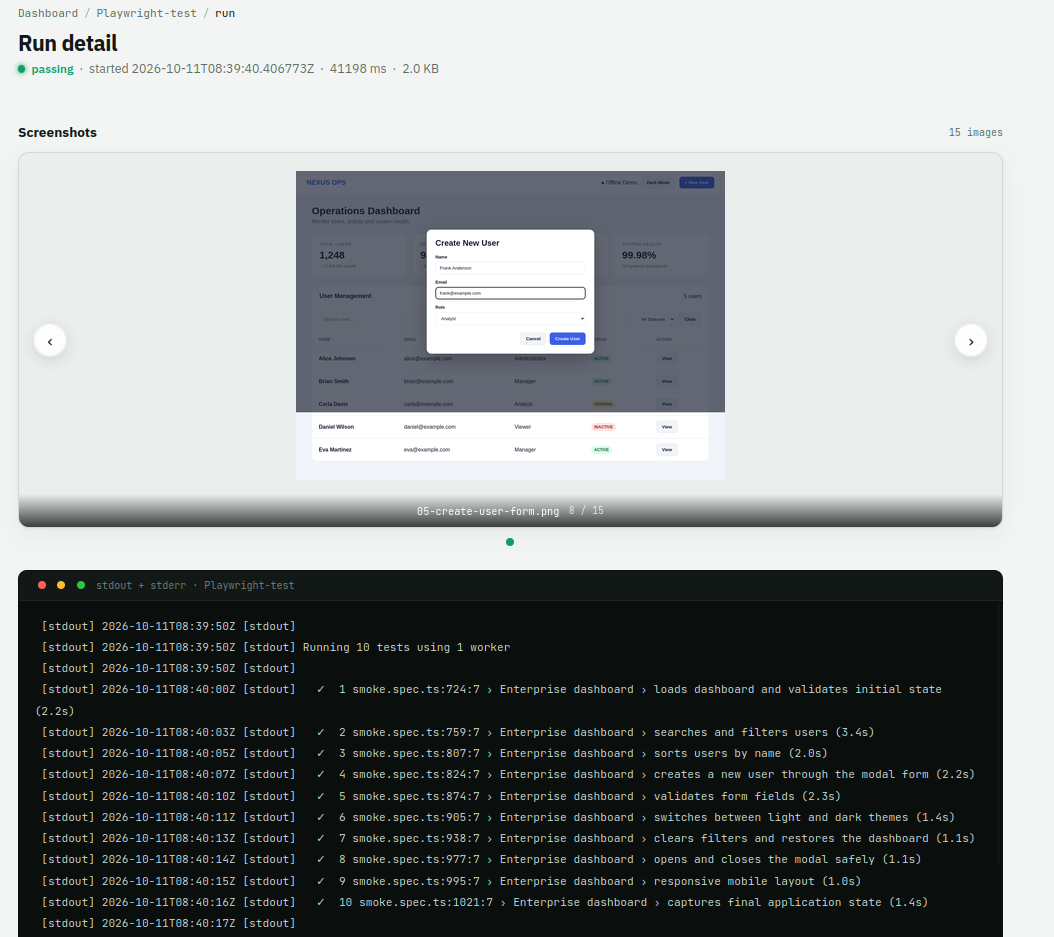
- Logs and screenshots. Timestamped stdout/stderr for every run, and Playwright screenshots collected automatically.
Uploading a test takes one form, or one curl:
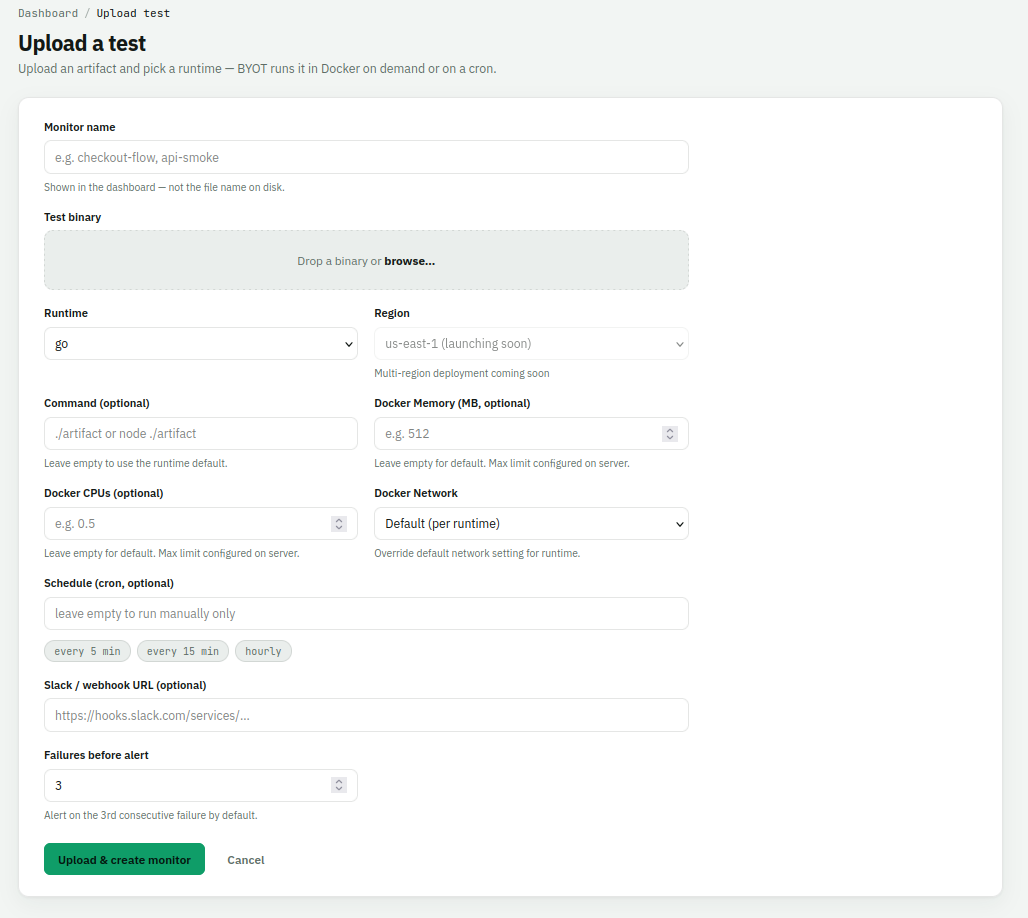
curl -X POST http://localhost:3000/uploadBinary \
  -F "binary=@./checkout.zip" \
  -F "runtime=playwright" \
  -F "cron=*/15 * * * *" \
  -F "webhook_url=https://hooks.slack.com/services/..."
When a run finishes, you can open it and see exactly what happened: the full log and, for Playwright, every screenshot the suite took.
How I approached it
1. Start with the smallest loop that works
The first version was embarrassingly simple: upload a Go binary, store it in MinIO, download it, run it, save the output. That’s all.
Artifact → Runtime → Execute → Exit code → Logs → TestRunIt was ugly, but that loop turned out to be the core of the whole product, and I never threw it away. Everything after that was building outward from it, not rewriting it.
2. Get execution out of the HTTP request
In the first version, the HTTP handler ran the test itself and kept the request open for 30, 60, 120 seconds. That’s fine for one test. With a hundred tests scheduled for the same minute, it falls over.
So POST /run now just creates a job and returns right away. The jobs live in a Postgres queue, and a bounded worker pool picks them up using FOR UPDATE SKIP LOCKED, so two workers can never grab the same job. I deliberately didn’t add Kafka or Redis. Postgres was already there, and it’s more than enough at this scale.
HTTP server ── /run ──► Postgres job queue ◄── Scheduler (cron, every 30s)
                               │
                               ▼
                     Worker pool (bounded)
                               │
                               ▼
                docker run (hardened, ephemeral)
                               │
            ┌──────────────────┼──────────────────┐
            ▼                  ▼                  ▼
     logs + screenshots    run result       webhook alert
        → storage          → Postgres        / recovery
The scheduler only adds jobs to the queue. Workers only run them. Keeping those two jobs separate made everything else easier, including stopping a run, timeouts, and shutting down cleanly while workers finish their current jobs.
3. Think in “artifact + command”, not “binary”
My first model was Test → Binary. Playwright broke it straight away, because a Playwright project isn’t one file. It’s a folder with package.json, a config, the specs, node_modules, and it needs a browser.
So I changed the model to an artifact plus a command, run inside a runtime image:
| Runtime | Image | Default command |
|---|---|---|
node |
node:18-alpine |
node ./artifact |
python |
python:3.12-alpine |
python ./artifact |
go |
ubuntu:24.04 |
./artifact |
k6 |
grafana/k6 |
k6 run ./artifact |
locust |
locustio/locust |
headless wrapper script |
playwright |
mcr.microsoft.com/playwright |
npx playwright test |
BYOT doesn’t need to understand every test framework. It just needs to set up the environment for the command to run in. If you need something else, you can override the command. Adding Locust later, including SLO thresholds like “fail if p95 is over 500ms”, took a new entry in this table, not a redesign.
4. Treat every upload as untrusted code
This is the part I spent the most time thinking about. BYOT runs code that other people upload. In my first prototype, that code ran directly on the API host. For a demo on my laptop that was fine. For anything public, it was unacceptable.
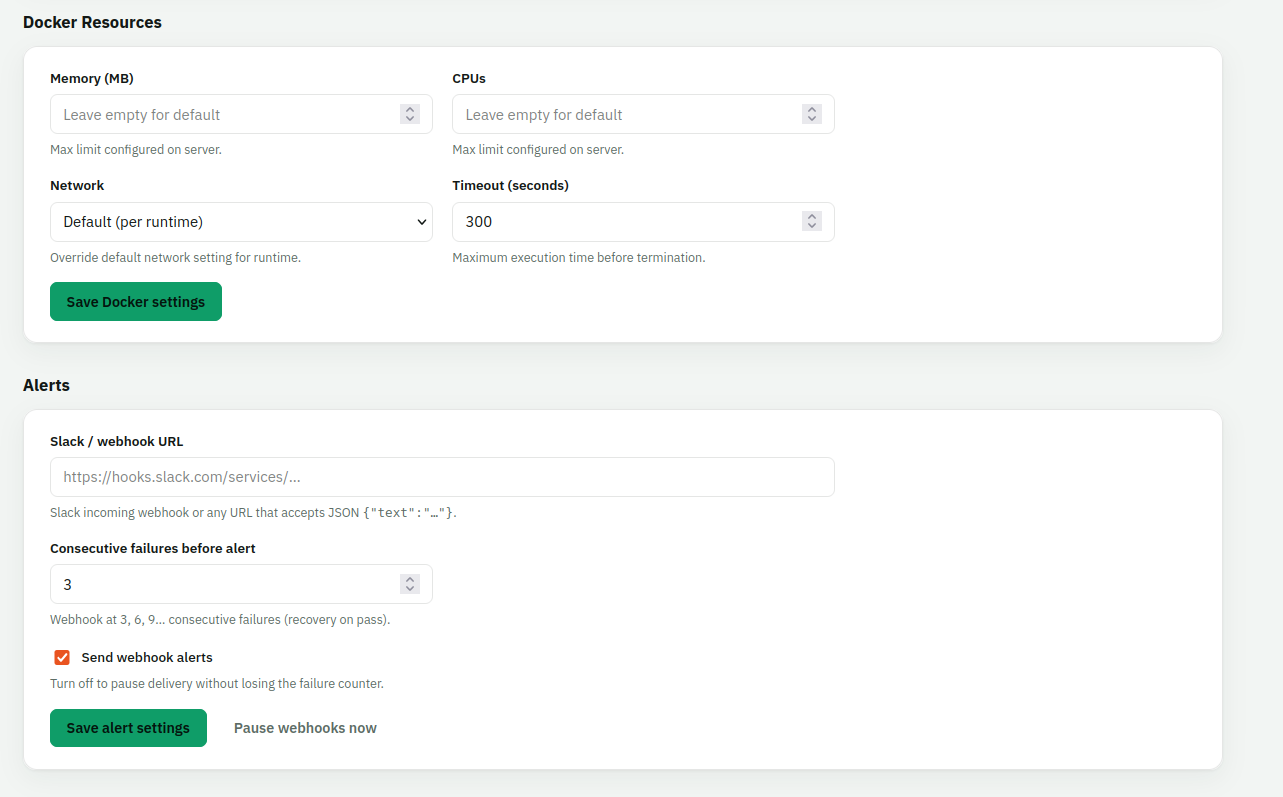
Now every run gets its own container, and it’s locked down:
"--network=" + network,   // "none" unless the runtime needs it
"--memory=" + memory,
"--cpus=" + cpus,
"--pids-limit=128",
"--cap-drop=ALL",
"--security-opt=no-new-privileges",
"--read-only",
"--tmpfs=/tmp:rw,exec,nosuid,size=256m",
fmt.Sprintf("--user=%d:%d", os.Getuid(), os.Getgid()),
No Linux capabilities, a read-only filesystem, a non-root user, a cap on the number of processes, and no network by default. Only runtimes that need to reach the internet (k6, Playwright, Locust) get it, and you can change that per test. Each container is named byot-<jobID>, so a timeout or a “Stop” click kills exactly the right container. A background sweep marks any job stuck in running as failed.
5. Make alerts something people won’t mute
Monitoring tools usually fail the same way: one flaky test pages someone at 2am, they mute the channel, and then real failures get missed too.
So BYOT only alerts on consecutive failures. The rule is one line of Go:
// Alerts fire at threshold, 2×threshold, 3×threshold, … consecutive failures.
return consecutive >= threshold && consecutive%threshold == 0
With the default threshold of 3, a single flaky run doesn’t alert anyone. A real outage alerts at 3 failures, then 6, then 9, so you’re reminded without being flooded. When the test passes again, you get a ✅ recovery message. You can also pause webhooks without resetting the failure counter.
6. Secrets, because real tests need them
A test that checks production needs an API key or a login. Secrets in BYOT are encrypted with AES-256-GCM, can be written through the API but never read back, and are only passed to Docker by name, so the values never show up in the host’s process list. Before logs are stored, every secret value is replaced with ***, including its base64 and URL-encoded forms.
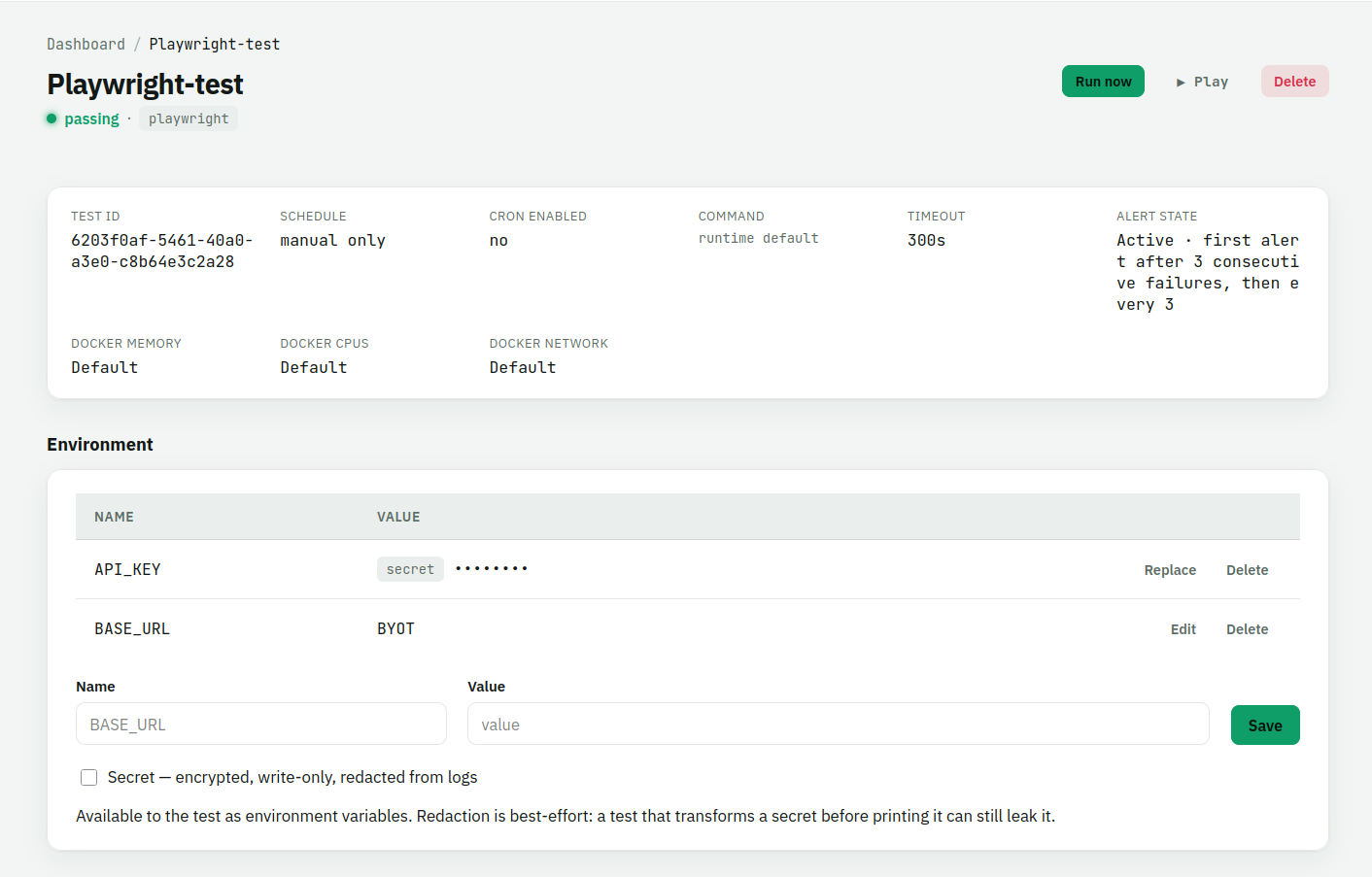
I’m upfront about the limits in the UI too. If a test transforms a secret before printing it, redaction can’t catch it. Saying that clearly is better than promising more than the tool can do.
7. Ship, then polish
I wrote myself a rule in the plan: don’t spend months polishing infrastructure before finding out whether anyone wants this. Multi-region runners, Kubernetes, an HA scheduler and billing are all on the roadmap, and I left them all there on purpose.
My real milestone isn’t “phase 5 complete”. It’s this:
Three people outside my machine have a real production test running on BYOT and receive a useful failure alert.
How it fits together
The stack is deliberately boring:
- Go for the API, scheduler and workers, all in one binary
- Postgres for tests, runs, and the job queue
- MinIO (or any S3-compatible store, or Supabase Storage) for artifacts, logs and screenshots
- Docker as the sandbox
- Supabase auth, optional, to protect every write route
- An hourly retention sweep that prunes old runs, logs and screenshots
docker compose up, run the migrations, go run ., and the dashboard is at /app.

Who I think this helps
- Small teams without a dedicated SRE who already wrote E2E tests and want them watching production, not just guarding PRs.
- QA engineers whose Playwright suites are the most realistic description of how the product should behave. BYOT turns that work into monitoring without rewriting anything.
- Teams who can’t send credentials to a third party. It’s MIT-licensed and runs on your own box.
- Anyone who has learned about an outage from a customer. That’s the exact feeling BYOT is built to prevent.
What’s next
- Generic artifacts: collect anything a run writes to an output folder (traces, JUnit XML, HTML reports)
- JUnit/TAP parsing, so the dashboard shows “8 of 10 passed” for any framework
- Custom Docker images, so “anything Docker can run” really means anything
- Multi-region runners, once real users ask for them
Try it
The fastest way to understand BYOT is to upload a test and watch it run. Try the playground, or clone the repo and self-host it. If you have a test suite that only runs when you deploy, I’d really like to hear whether this solves your problem, or what’s stopping it from doing so.
that's a wrap!
Back to all articles